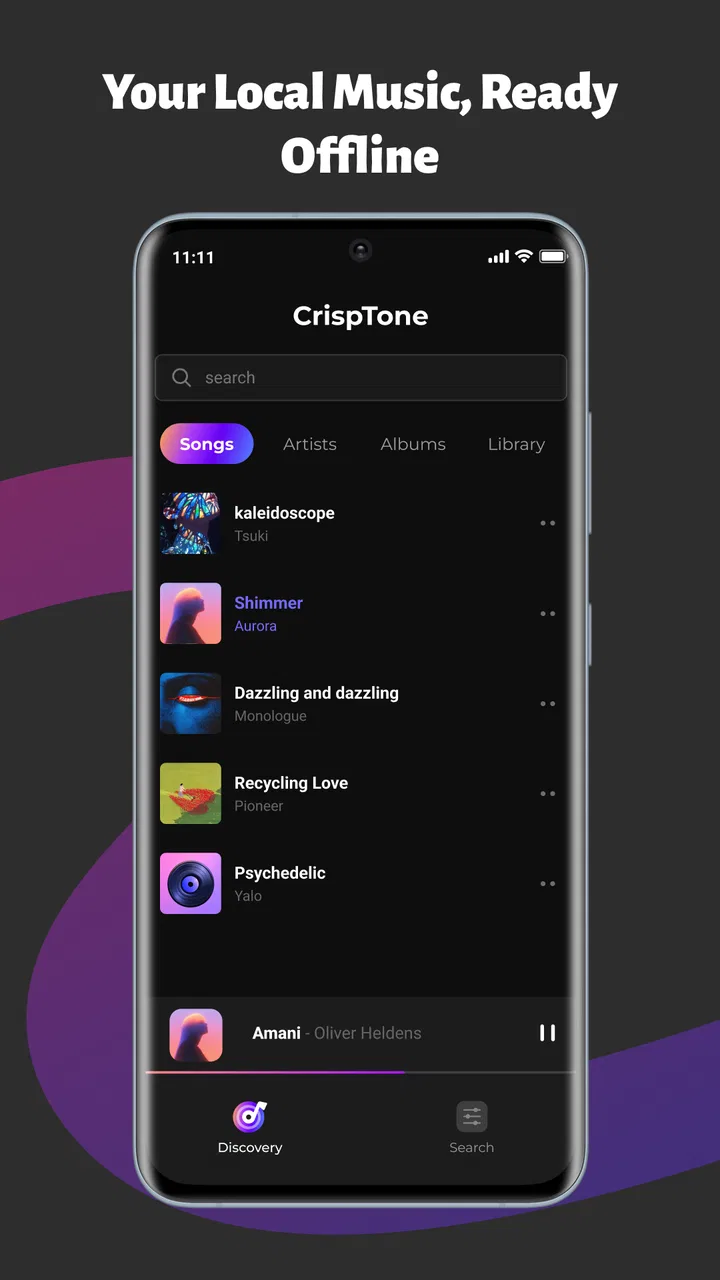
CrispTone: Offline Music
- 4.2
- Rating
- 1.00M
- Installs
- Free
- Price

 Analysis by App-foxy
I spent time with CrispTone: Offline Music as a straightforward music and audio app, and my first impression was that it is aimed at people who want their own files to play without depending on a connection. That sounds simple, but the real test is not pressing play once. It is whether the app makes local listening easy on an ordinary day: finding the right folders, building a useful queue, adjusting sound without making every song feel unnatural, and keeping playback available when the signal disappears.
That focus gives CrispTone a clear identity. It is not trying to replace a large streaming catalog. Instead, it works around music already stored on the phone, with playlists, an equalizer, and background controls forming the practical core. I like that direction because it avoids the distraction of recommendations and online accounts when I only want to listen to albums or personal recordings I already have. At the same time, this approach means the experience depends heavily on how well the device stores and exposes those files.
Where the listening experience can get stuck
The most common point of friction with a local music player is usually before the first song starts. A person may expect the app to show every track immediately, then wonder why a recently copied album is missing or why an unfamiliar file appears with incomplete information. That is not necessarily a playback failure. Local players have to work with the folders and file details available on the device, so an untidy music library can make the first screen feel less polished than a streaming service.
You May Also Like

 Blood Strike: 2.5 Anniversary
Blood Strike’s Loadouts Turn Every Drop Into a Tactical Gamble
A close look at Blood Strike’s custom loadouts: how fast access to signature weapons reshapes its battle royale rhythm, rewards preparation, and narrows the gap between fights.

 Pandora - Music & Podcasts
Pandora’s Music Is Easy to Start, but Harder to Recover
Pandora’s strength is its low-effort path from a seed to a station. Its weak spot is how much confidence it asks you to place in connection, setup, and quiet recovery.

 8 Ball Pool
 Is Built on Rivalries, Rematches, and Routine
A close look at the rivalries, rematches, shared routines, and unanswered safety questions that turn a quick pool match into a persistent mobile community.

 Samsung Music
’s Quiet Strength Is Playing What You Already Own
Its reach comes less from spectacle than from dependable access to a personal library. That simplicity is both the app’s strongest retention engine and its ceiling.

 AccuWeather: Weather Radar
AccuWeather Review: A Quick, Clear Forecast for Everyday Decisions
For everyday plans, the best forecast is the one you can understand quickly. AccuWeather makes rain timing, radar, and local conditions easy to act on, with a few trade-offs.

 Hill Climb Racing
Why Hill Climb Racing Still Turns Crashes Into One More Run
A tiny car, a bumpy hill and one more upgrade: Hill Climb Racing keeps resurfacing because its simple chaos makes every near-miss feel personal.
More From Our News Desk



My advice is to treat the first launch as a library check rather than a final judgment. Give the app a moment to recognize the music already on the phone, then look through the available songs and albums before creating a large playlist. If one recording is absent, check whether it is actually stored locally and whether it opens from the phone’s file manager. This simple test separates a library-organization problem from an app problem.
Another place users can get stuck is the difference between a playlist and a temporary queue. A playlist is useful for a repeatable collection, such as a commute or a workout. A queue is better when I want to make a one-time sequence without changing my saved organization. Mixing those two ideas can lead to the impression that songs have vanished or that an old order has been overwritten. I found it more reliable to decide first whether I am building something permanent or just arranging the next listening session.
Background playback is also worth testing early. CrispTone is designed to continue playing while I use other parts of the phone, but the result can still be affected by device settings. If music stops when the screen turns off, I would first check whether the app continues normally while the screen remains awake, then inspect the phone’s battery or background restrictions. That process is more useful than repeatedly pressing play, because it identifies whether the interruption happens during ordinary playback or only when the operating system limits background activity.
The same applies to the controls shown outside the app. A lock-screen or notification control may depend on the phone’s system behavior, connected accessories, and the way the device handles background audio. If the physical play button on headphones does nothing, I would test the on-screen controls first. If on-screen playback works but the accessory does not respond, the accessory connection is the more likely place to investigate.
What I would check before blaming the player
When a track refuses to play, I would avoid changing several things at once. First, I would try another local song. If other files work, the issue is probably tied to that particular recording or its location. Next, I would close and reopen the app, then confirm that the file still opens from the phone’s own storage tools. A moved, renamed, incomplete, or inaccessible file can look like a player fault even when the player is behaving normally.
It is also worth checking whether the phone has enough free storage for ordinary operation. CrispTone is an offline player, not a tool that magically creates local copies of music that is only available online. If the goal is to listen without a connection, the audio must already be present on the device. This is an important distinction for anyone moving from a streaming app: saving an album for offline use in one service does not automatically make those tracks available to an independent local player.
File organization makes a surprisingly large difference. I would keep albums in clearly named folders, avoid creating several copies of the same recording, and use consistent artist and album information where possible. That does not add a new feature to CrispTone, but it makes its existing browsing and playlist tools much easier to use. For people with years of scattered downloads, a little cleanup before importing a large library can save more time than repeatedly rebuilding playlists.
Setup checks that make offline listening smoother
Getting started is best handled in a small, controlled test. I would begin with a handful of local tracks from different albums rather than loading the entire music collection at once. This lets me confirm that the app sees the intended files, that titles are readable, and that playback behaves correctly when I leave the app. Once that basic path works, adding more music becomes easier to troubleshoot because I know the starting setup is sound.
The app comes from Technology Hub Pro and is available free of charge, which makes this kind of trial easy to justify. It is listed for Everyone, and it runs on devices using Android 8.0 or later. Those details matter for people using an older phone: compatibility is not the same as performance, so an eligible device may still feel slower when handling a large, disorganized library. I would test the actual listening routine on the phone I plan to use rather than assuming a newer device’s behavior will be identical.
The current release is version 1.0.8, and I would keep it updated through the normal app store process. Updates can resolve ordinary playback or interface issues, but I would not treat updating as a cure for every missing-track problem. If the file is not stored where the app can access it, or if it is damaged, a newer version will not turn it into a usable recording. Troubleshooting works best when the library and the app version are checked separately.
One practical setup decision is where to keep music that I use often. If a track sits on removable storage or in a folder that is frequently reorganized, it may be less dependable than a file kept in a stable local location. I would create a simple music folder, copy a small test selection there, and use those files for the first playlist. That gives the app a consistent source and makes it easier to notice whether later changes to storage are responsible for a track disappearing.
The equalizer deserves a careful first test rather than an immediate dramatic adjustment. I prefer to start with the sound unchanged, then make one small adjustment while listening to a familiar song. If the bass becomes too strong, vocals can lose clarity; if treble is pushed too far, cymbals and compressed recordings can become tiring. The useful insight here is that the best setting may differ by headphones, car speakers, or the phone’s own speaker, so I would not judge the equalizer from one listening setup alone.
I would also create playlists with a purpose instead of copying the entire library into one enormous list. A short “daily” collection, a longer travel selection, and a folder of spoken or personal recordings are easier to manage than a single list that mixes everything. This is one of CrispTone’s practical strengths: because the app is centered on local playback, I can shape the listening environment around my own files instead of accepting an online service’s organization.
A realistic everyday routine
Imagine preparing for a train ride through an area with unreliable reception. The night before, I would verify that the chosen tracks play with mobile data and Wi-Fi disabled, then start the playlist and lock the screen. I would not wait until the journey to discover that the music was only available through a streaming app or that a file had been moved. That small offline test is more valuable than simply seeing a song title in a library.
During the trip, I might use the background controls to pause for an announcement, skip a track, or resume after checking a message. If playback stops after a long period with the screen off, I would inspect the phone’s battery-management settings before rebuilding the playlist. If only one track causes trouble, I would remove that file temporarily and continue with the rest of the collection. This workflow keeps a single bad file from disrupting the whole trip.
For exercise, I would make a playlist in advance and use a modest equalizer adjustment that suits the headphones I actually wear. For studying, I would use a calmer, predictable sequence rather than a random library queue. For family recordings or downloaded audio that I do not want mixed with music, I would keep a separate playlist. These are small habits, but they turn a basic local player into a more dependable personal audio tool.
Recovering a broken workflow without starting over
When a playlist behaves unexpectedly, I would first identify whether the problem is the order, the file, or playback itself. If every song plays but the sequence is wrong, rebuilding the entire library is unnecessary; I would edit the playlist or create a clean replacement from a known group of files. If one song fails repeatedly, I would test that recording independently and leave the rest of the playlist intact.
A useful recovery method is to make a temporary “test” playlist with one working track and one troublesome track. If the working song continues in the background but the troublesome one stops or skips, the comparison points toward the file rather than the general player. If both fail under the same conditions, I would look at the phone’s background behavior, audio output, or storage access. This two-track method is quicker and more informative than guessing.
Sound problems should be diagnosed separately from library problems. A song that plays quietly may be mastered at a lower level, routed to a different output, or affected by an equalizer change. I would return the equalizer to a neutral setting, confirm the selected headphones or speaker, and compare another recording. If only one album sounds unusual, that may be a characteristic of the recording. If every track changes, the player or device audio settings deserve attention.
When an external control stops responding, I would keep the app open long enough to confirm that playback itself is stable, then disconnect and reconnect the accessory. I would also try the phone’s own controls. This matters because a local music app can be playing correctly while a Bluetooth connection, headset button, or system-level media session is misbehaving. Keeping those tests separate prevents unnecessary playlist edits and avoids mistaking a connection issue for lost music.
There is another recovery habit I find valuable: do not reorganize files while a playlist is being tested. Renaming folders, moving albums, and changing storage locations at the same time makes it difficult to know what caused a track to disappear. I would first restore a stable folder structure, confirm playback, and only then make one organizational change. For a large collection, this disciplined approach is slower for a few minutes but much faster than trying to reconstruct the cause later.
When CrispTone is not the cause
Offline music apps are often judged for problems created elsewhere. A missing album may simply be a streaming download that is locked inside another service. A silent track may be damaged before CrispTone ever sees it. A pause after the screen turns off may come from the phone restricting background activity. Recognizing these boundaries is important because the app’s job is to play accessible local audio, not to manage every form of music storage on a phone.
The same distinction applies to network expectations. CrispTone makes sense when I already own or have locally stored the audio files. It is not the better choice for someone who wants instant access to a huge online catalog, automatic discovery, synchronized listening history, or cloud-based libraries across several devices. A streaming service is more convenient for that purpose, even if it introduces subscriptions, connection requirements, or platform-specific offline downloads.
On the other hand, a more advanced desktop-style music manager may suit listeners who need extensive tagging, library conversion, server access, or elaborate synchronization. CrispTone’s appeal is its directness. I would choose it for local albums, personal recordings, and a controlled offline routine, not for managing a complicated multi-device audio archive.
There is also a trade-off in keeping the app simple. Playlists and an equalizer cover the needs of many casual listeners, but people who expect studio-level audio analysis or a deeply customizable catalog may want a specialist tool. I would not call that a flaw in the everyday use case; it is a reason to match the app to the job. Its value comes from reducing the distance between a file on the phone and a song that plays reliably.
Who should use it and who should skip it
I think CrispTone is a good fit for someone who has a personal collection of local music and wants a free way to listen without relying on mobile data. It also suits travelers, commuters, people with limited connectivity, and listeners who prefer their own album order over algorithmic recommendations. The background controls are especially useful for anyone who wants to start music and then put the phone away.
It is less suitable for a listener whose collection exists almost entirely inside online services. If the main goal is discovering new artists, following shared playlists, or switching seamlessly between devices, an online music platform will probably feel more complete. I would also hesitate to recommend CrispTone as the only solution for someone with a badly scattered library who does not want to spend time organizing files. The app can make local listening easier, but it cannot remove the underlying maintenance work.
People who are sensitive to sound should spend time with the equalizer rather than assuming a stronger setting is better. A small adjustment can help match a particular pair of headphones, while an aggressive profile may make some recordings harsh or muddy. I would save the setting that works for the equipment I use most and change it only when moving to a noticeably different speaker or headset.
The app’s audience is broad enough to explain its Everyone rating, but that does not mean every phone will offer the same smooth experience. Older hardware, restrictive power settings, crowded storage, and inconsistent file organization can all affect the routine. The most reliable users will be the ones willing to perform a short offline test and keep their music in a stable location.
My practical verdict after using it
CrispTone: Offline Music succeeds because it concentrates on a useful, familiar task: playing music that is already on the phone. I appreciate the combination of playlists, background controls, and an equalizer because those are the tools I actually reach for during a commute or a quiet evening, rather than features that exist only to make a store page look busy. Its free price and broad device compatibility also make it easy to try without committing to a subscription.
My main caution is that the app cannot compensate for a confusing local library or a phone that aggressively limits background activity. Before deciding that it is unreliable, I would test a few known-good files, confirm that they are genuinely stored on the device, try playback with the screen locked, and return the equalizer to a neutral position if the sound seems wrong. Those checks cover most of the practical friction I would expect from this kind of setup.
With a tidy music folder and realistic expectations, I found the experience more useful than a generic player that simply starts a file and leaves everything else to the user. The strongest workflow is to prepare playlists before leaving home, test them with the connection disabled, and keep troubleshooting focused on one variable at a time. The key advantage is dependable control over music you already have, not access to music you have not downloaded.
With an average rating of 4.3 from around 1.3 thousand ratings and more than one million installs, the app has clearly attracted a substantial audience. I would still base the decision on listening habits rather than popularity. If your priority is personal offline playback with light organization and quick sound adjustments, I can recommend giving CrispTone a try. If you want a streaming catalog, cloud synchronization, or advanced library management, another category of app will serve you better.
FAQs for CrispTone: Offline Music
01What is CrispTone: Offline Music, and how does it work?
CrispTone: Offline Music is designed for listening to music stored directly on your Android or iOS device without relying on a continuous internet connection. After adding compatible audio files to the app or making them available through its supported import options, you can browse your library, create playlists, and play tracks offline. Its usefulness depends on the music files you already own or legally have access to.
02Can I use CrispTone: Offline Music without an internet connection?
Yes, offline playback is the main reason to use CrispTone: Offline Music. Once your audio files have been imported or downloaded through a supported and legitimate source, the app can play them without mobile data or Wi-Fi. Internet access may still be required initially for importing files from certain services, downloading artwork, synchronizing content, or checking app-related information.
03Does CrispTone: Offline Music include songs or a built-in streaming catalog?
CrispTone: Offline Music should not be treated as a replacement for a music-streaming subscription unless its current store description specifically confirms that feature. The app is primarily intended for managing and playing offline audio available on your device. You generally need to provide your own music files or use supported legal transfer and download methods rather than expecting unrestricted access to commercial songs.
04What audio formats and music-management features does CrispTone support?
Support for audio formats can vary according to the app version and the operating system, so checking the current Google Play or App Store listing is recommended before downloading. In everyday use, the important features to look for are library organization, playlists, album and artist browsing, playback controls, repeat and shuffle options, and background playback. Compatibility may differ between individual files.
05Is CrispTone: Offline Music free, and what permissions does it require?
The download price, advertising, and any optional premium features can change over time, so review the store page before installation. Because CrispTone handles local music, it may request permission to access audio files or media stored on your device. Only grant permissions that match the app’s purpose, and check its privacy information if you are concerned about analytics, advertising, account access, or data collection.
Pros
- Works without an internet connection once tracks are stored locally.
- Simple interface makes browsing and playing music quick.
- Uses little mobile data during everyday listening.
- Supports background playback while using other apps.
- Offline access helps preserve battery during travel or commuting.
Cons
- Music availability may depend on the selected source or imported files.
- Limited discovery tools compared with major streaming platforms.
- Local storage can fill up quickly with large music libraries.
- Some advanced audio features may require a paid upgrade.
- No cloud sync can make playlists harder to transfer between devices.

CrispTone: Offline Music
Gallery